

An AI coding environment written as a Total.js 5 application.
Open a project, talk to an agent that reads your code, edits files and runs commands, and review every change. You choose the model: one on your computer, a free cloud one, or a paid one.


Website · Getting started · User guide · Help
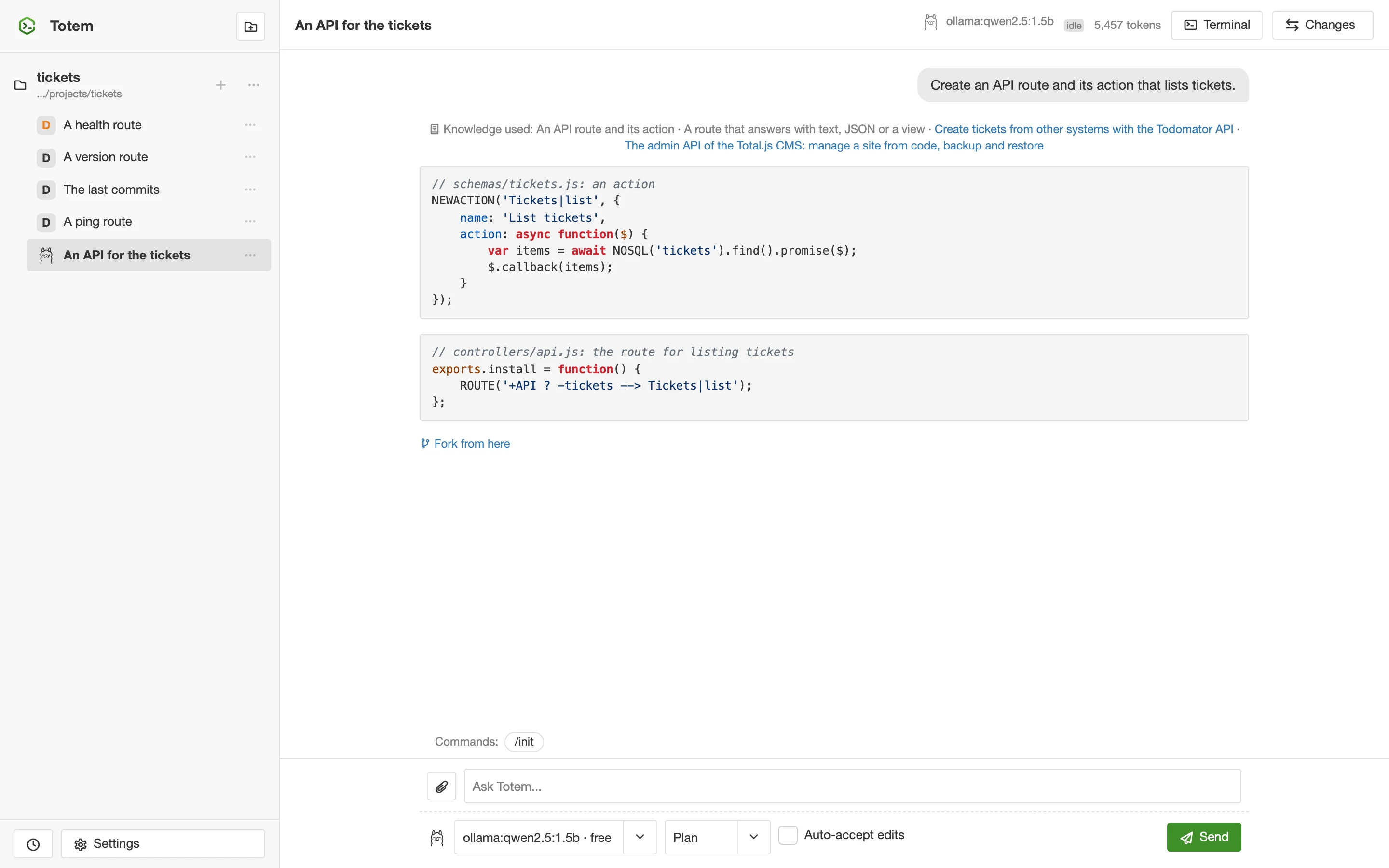
Totem is one application with three ways to run: a command, a Docker container and (next) a native window. The server is plain Total.js: actions, a few controllers, NoSQL for its own data, and jComponent 20 for the interface. There is no build step.
- An agent with tools. It reads, searches, edits, patches and runs commands in your project folder, and it cannot leave it (every path is resolved inside the project, symbolic links included).
- A whole application in small tasks.
/projectturns a request into a short plan, and/buildwalks its tasks one by one: each file is written with only what it needs in front of the model, and checked before the next. A model of 4B that could not hold the application in its head does not have to. See projects. - You stay in control. Every file change and command asks first, unless you allow it. Plan mode only reads and describes; Build mode changes things. See the diff of each step, undo it, redo it.
- Any model. Ollama, LM Studio and llama.cpp on your computer are detected for you; OpenRouter, OpenAI, Anthropic, Gemini, Groq, Mistral, DeepSeek and a dozen more (any OpenAI-compatible server) are in the list. Prompts go only to the providers you add.
- It knows Total.js. In a project that depends on
total5the agent gets the recipes of Totem, the pages of its own Total.js library for your request, the conventions as a skill, and a check of everything it writes: syntax, style, invented functions. Small local models get focused examples; the quality of an application still depends on the model and needs testing. - Sub-agents. Helpers with their own context, tools and model that the main agent hands a task to; several work at the same time, and the Agents panel adds yours.
- Work in parallel. Sessions can run in their own git worktree, and scheduled prompts run by themselves, unattended and read-only unless you say otherwise.
- A terminal that stays. An interactive shell in the project folder that survives a page reload, and background commands the agent can start and read.
- The hands of a larger model. Claude Code, Codex or another agent writes the plan of an application and reviews the result, and Totem writes the files with the model of your computer:
totem project,totem buildand a few lines back, so the tokens that cost money are not spent on the files. Give the other agent the address/agent/and it reads how. See projects. - Open protocols. A client of MCP servers (tools and prompts) for the agent, and Totem itself as an MCP server for other agents (off by default).
- Careful with your machine. Configured keys are masked,
.envreads ask first, a shared server needs a token, and the Docker image runs without root. - Your language. English, Spanish and Slovak, chosen in Settings.
Totem is also a small language model trained for Total.js. It knows its application, and its application knows it:
- In its application it builds whole applications: it has the tools, the plan and the checks, reads and writes the files of your project and builds a Total.js 5 application task by task.
- Anywhere else (Ollama, LM Studio, any chat) it is an assistant that knows Total.js: it answers your questions about Total.js 5 and jComponent 20 with short code, and for a whole application it sends you to its application.
In Totem, Settings > Totem 4B > Download gets it and runs it on your computer with llama.cpp: Totem downloads the model and llama.cpp, checks both and starts them, and totem:4b appears in the model selector. Nothing leaves your computer. It is also on Ollama (ollama run totaljs-es/totem), LM Studio and Hugging Face, for any program you prefer.
Three ways: npm (below), Docker (docker pull ghcr.io/totaljs-es/totem:latest, see Docker) or the source.
You need Node.js 22 or newer.
npm install -g totaljs-totem
totem            # starts Totem in the background and opens the browser
totem 4524       # the same, on another port
totem stop       # stops it
The browser opens on http://127.0.0.1:8000, and the terminal is yours again. Installed from npm, your data (providers, projects, sessions) lives in a folder of your user (totem config prints it) and not in the package, so an update never touches it.
git clone https://github.com/totaljs-es/totem.git
cd totem
npm install
node index.js 8000Press Settings and add a model:
- A model on your computer. Install Ollama, pull a model (
ollama pull qwen2.5-coder), and press Look for servers on this computer. - A cloud model. Add a provider, paste the key (it is stored encrypted on your computer and never shown again) and choose the models you want.
Then Open a folder, write what you want, and watch it work.
totem run "explain this project" --project ~/code/app --model ollama:qwen2.5-coder(From a clone, npm link makes the totem command.)
| Command | What it does |
|---|---|
totem [port] |
Starts the server on port 8000 (or the one you give: totem 4524) in the background, shows where it listens and opens the browser. The terminal is free |
totem start [port] |
The same, without opening the browser (--port 4524 also works) |
totem stop |
Stops the server that totem started |
totem status |
Says if it runs and where (pid, address, log) |
totem restart |
Stops it and starts it again, on the same port |
totem serve [port] |
Runs the server in this terminal until Ctrl+C (for a server, a script or when you develop Totem). --verbose shows its whole output |
totem run "prompt" [options] |
One prompt without the interface: the answer goes to stdout, the tool calls to stderr, the exit code says if it finished |
totem project "card or request" |
Keeps the plan of a whole application in the project (--project <folder>); the answer is a few lines |
totem build |
Makes the tasks of the plan that are not done, one file each, and says what is done and what failed (--wait waits for the end) |
totem plan |
Prints the plan and the state of its tasks |
totem config |
Prints the folders that Totem uses |
Options of run: --project <folder>, --model <provider:model>, --url <server>, --token <token>, --auto-accept (file edits run without asking), --yes (every other question is answered "allow once"). Without --url a temporary local server is started. --data <folder> chooses where the data goes.
In the conversation, /project and then /build:
/project a helpdesk with tickets and customers
/build
/project keeps a short card (the plugins of the application and the fields of each one) and /build makes its tasks one by one: the files that every application has, and for every plugin its routes, its actions, its screen and its form. Each task writes one file with only what it needs in front of the model, and it is checked before the next. At the end, npm install and node index.js 8000.
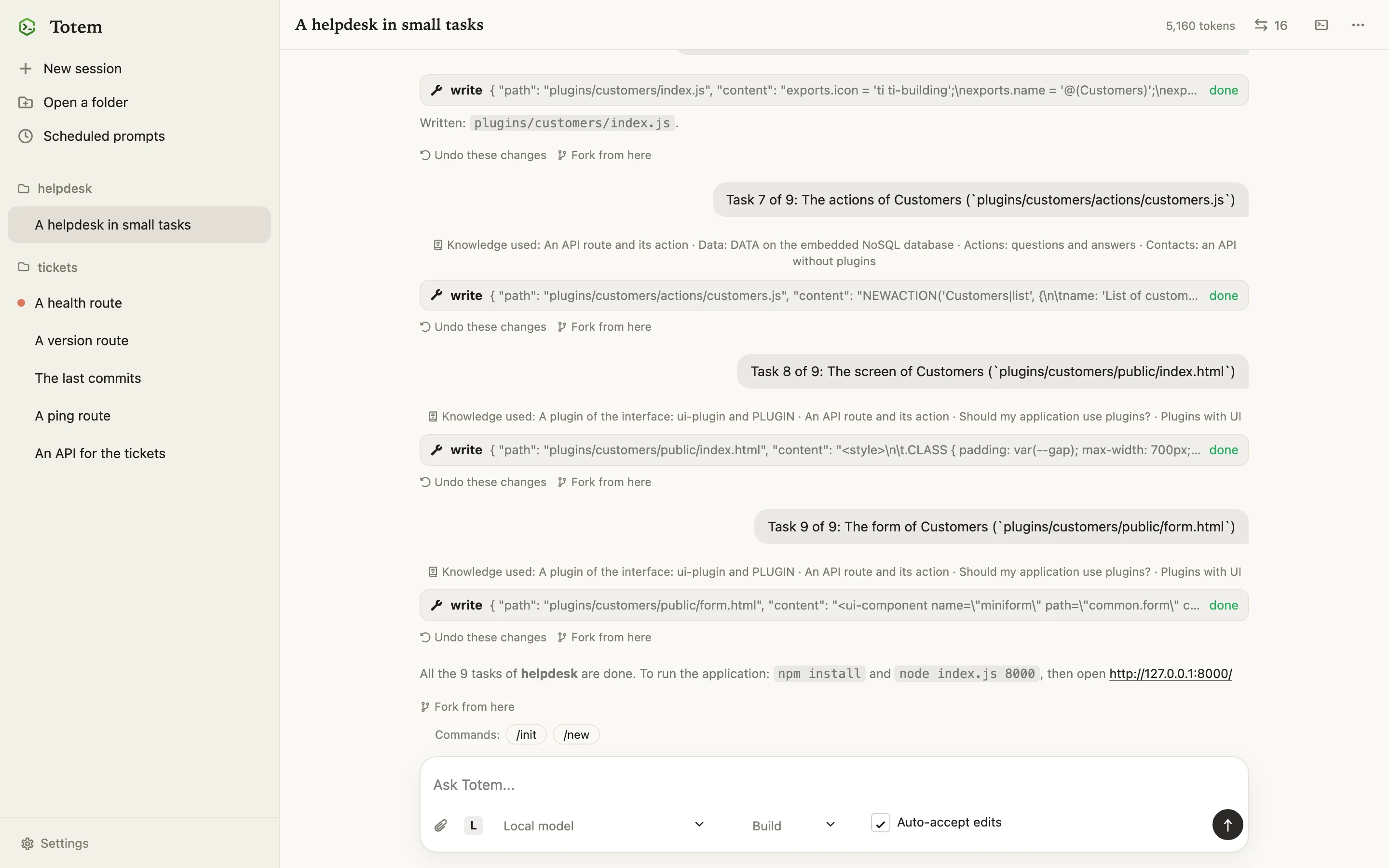
A large model can use Totem as its hands and keep its tokens for what needs them:
- It plans. The agent reads your request and writes the card of the application: a couple of hundred tokens.
- Totem writes. The files are written and checked by the model of your computer, which costs nothing. They are most of the tokens of an application.
- It reviews. The agent gets a few lines back (
shop: 9 of 9 tasks done, or the task that failed and why) and reads a file only when it wants to.
To start, tell your agent where Totem is:
Build it with Totem: read http://127.0.0.1:8000/agent/
That address answers in plain text with everything the agent needs. From there it uses the commands totem project, totem build and totem plan when it has a shell on the same computer, the routes POST /agent/project/, POST /agent/build/ and GET /agent/status/ when it does not, or the MCP server of Totem from a chat application. See projects.
docker pull ghcr.io/totaljs-es/totem:latestThen run it with a token and your project mounted:
echo "a-long-random-token" > token.txt
docker run --rm -p 127.0.0.1:8000:8000 \
  -v "$PWD/token.txt:/run/secrets/totem_token:ro" \
  -v "$PWD:/workspace/project" \
  -v totem-data:/data ghcr.io/totaljs-es/totem:latest
Open http://127.0.0.1:8000, sign in with the token, and open the folder /workspace/project. The image is for linux/amd64 and linux/arm64. The tags are latest, the exact version (0.1.1) and the minor (0.1): pin one when you want updates only when you choose. The page of the image is on GitHub.
The container listens on all interfaces, so it refuses to start without an access token. Your projects are mounted under /workspace, the data is a volume, and everything runs as a user that is not root, which makes it the isolated way to try untrusted models. There is a compose example and the delivery notes. To build it yourself: docker build -t totem . in a clone.
| Projects | Folders with their sessions. Click one to continue, + for a new session, the menu for a named session or one in a git worktree. Rename with a double click. |
| Chat | Streaming answers, the thinking of the models that think, a copy button on every code box, attachments (images and text files), the /commands of the project and /init to write an AGENTS.md. |
| Changes | The files the agent changed, unified or split diff, Undo and Redo, the git state of the folder, and for a worktree session Merge into the project or Discard. |
| Terminal | The commands the agent ran, the ones in the background, and an interactive Shell (macOS and Linux). |
| Agents | The sub-agents the main agent can hand a task to: the built-in ones, the ones you save (for one project or for all) and the files of the project. |
| Scheduled prompts | The clock next to Settings: a prompt every N minutes or every day, in a new session, unattended. |
| Settings | Theme (light, dark, auto), language, providers and models with their abilities, and the values of the agent (limits, temperature, the knowledge of Total.js, the checks) for all projects, one project or one session. |
Totem works with a 1.5B model and with the biggest ones. A few tips:
- Small models on your computer follow instructions better with a low temperature (
temperature : 0.2inconfig, already the default for servers on your computer) and enough context: Ollama is asked for at least 16384 tokens, and for more when the request needs it, because its own default silently cuts the instructions. - A model that loops (repeats one paragraph until the context is full) is stopped by a repeat penalty and a limit per answer (
ollamarepeat,ollamapredict). - Reasoning models get a Reasoning control. The Anthropic and Gemini formats are written and tested against simulators, not yet with real keys: try them and tell us.
When the project depends on total5 (or is a new folder), Totem puts three things in front of the model:
- Recipes (
private/recipes/): short, exact answers for the common tasks (routes, actions, NoSQL, config,RESTBuilder, auth, CRON, WebSockets, views, jComponent, plugins...), chosen by the words of your request. They work offline and follow the conventions to the letter. - The library (totaljs-es/knowledge): conventions, questions and answers, tested applications and the catalogue of jComponent components and Total Icons, read live from its public index. The page that matches the request goes to the model, so a small model starts from the documentation and not from its memory. Small models use one focused recipe when it covers the task, and the pages when it does not. With
libraryanswers : truea question gets instead the one answer of the library that matches it, chosen by the model among a few candidates. - A check of the code: what the agent writes is checked against the Total.js conventions (syntax, ES5, tabs, names with
|, texts as@(English), no invented functions) and the model fixes what is wrong. The code in an answer is checked too, and corrected once.
To measure it with any model:
node scripts/knowledge-eval.js --model ollama:qwen2.5:1.5b --runs 3 --out result.jsonIt asks 29 questions about Total.js and jComponent in a temporary project and scores the answers: what must and must not appear, and the quality of the code. See knowledge.
Settings live in the file config (never in environment variables). The ones you will touch:
| Setting | Default | What it does |
|---|---|---|
$ip |
127.0.0.1 |
The address it listens on. Anything else needs token |
token, tokenfile |
empty | The access token, or a file that has it (a Docker secret) |
temperature |
0.2 |
For the models on your computer |
ollamactx, ollamactxmax |
16384, 32768 |
Context asked to Ollama |
maxsteps, bashtimeout |
50, 120000 |
Limits of the agent loop |
totaljs |
auto |
always or never to decide for every project |
library, recipes, selfcheck, conventions |
true |
The parts of the Total.js knowledge (library: the library of Totem, read live) |
forge |
false |
The pages of Forge as one more source, ranked together with the library. forgemcp : true adds its MCP server (it asks to start) |
selfchecksmall |
true |
The correction of the code is asked from models up to 4B too |
formatter, diagnostics |
true |
Run the formatter and the checks that the project already has after a write |
terminalshell |
empty | The shell of the Terminal (empty: your SHELL) |
$mcp |
false |
Totem as an MCP server for other agents |
A project can add a .totem/ folder with formatters.json, diagnostics.json, mcp.json, instructions.json, and agents/, commands/ and skills/.
- The agent acts through tools only, each checked before it runs. Plan mode refuses writes and commands in code, not in a prompt.
- Files with secrets (
.env) ask first; keys and the token are scrubbed from everything the model sees. - A server with a token compares it in constant time, uses a strict cookie, refuses requests from other origins, and sends headers against framing.
- The shell and the commands run with your permissions: they protect against mistakes, not against a hostile model. For that, use the Docker image.
The details, including the honest limits (one token, one user), are in security.
| Problem | What to do |
|---|---|
| No model to choose | Settings → add a provider, or Look for servers on this computer with Ollama or LM Studio running |
| A small model seems to ignore the instructions | Check ollamactx in config: Ollama must get a real context. Totem asks for 16384 by default |
totem says it could not start |
It says why: the port in use (use totem start 8001), no permission to write the data, or a broken installation. The whole output is in totem.log in the data folder |
| The container does not start | It needs a token: mount a file at /run/secrets/totem_token (or set token in config) |
| "The terminal could not start" | The Shell needs Python 3 (macOS and Linux). It is in the Docker image |
| Docker cannot see your folder (Colima, Docker Desktop) | Share the folder with the virtual machine: your home folder, not /tmp |
| A worktree could not be created | The project needs git with at least one commit |
| Scheduled prompts do nothing | They run unattended: in Plan mode they only read, and anything that would ask is refused. Choose Build and auto-accept to let them edit |
Run the tests with npm test (about 50 seconds, with temporary folders: it never touches your data).
Phases 1 to 5 of the roadmap are built: the agent and its tools, the interface, the knowledge of Total.js, the terminal, diagnostics, the Docker image, scheduled prompts, worktrees and the hardening of a shared server. Version 0.1.0 is the first one published: the package totaljs-totem on npm and the image ghcr.io/totaljs-es/totem for linux/amd64 and linux/arm64. Still to come: native windows with signed installers (phase 6) and accounts with their own projects. See the changelog.
The website has the guide to get started, the user guide and the help, with screenshots. The pages that explain how it works:
Vision · Architecture · Agent loop · Projects · Interface · Protocol · Security · Knowledge · Delivery · Roadmap · Decisions
Totem was inspired by OpenCode, and it is written from scratch to do something else: to be the coding agent of Total.js.
MIT. Made by the Spanish Total.js Platform.