
A self-hosted DNS filter and router for the home network — one Rust binary.
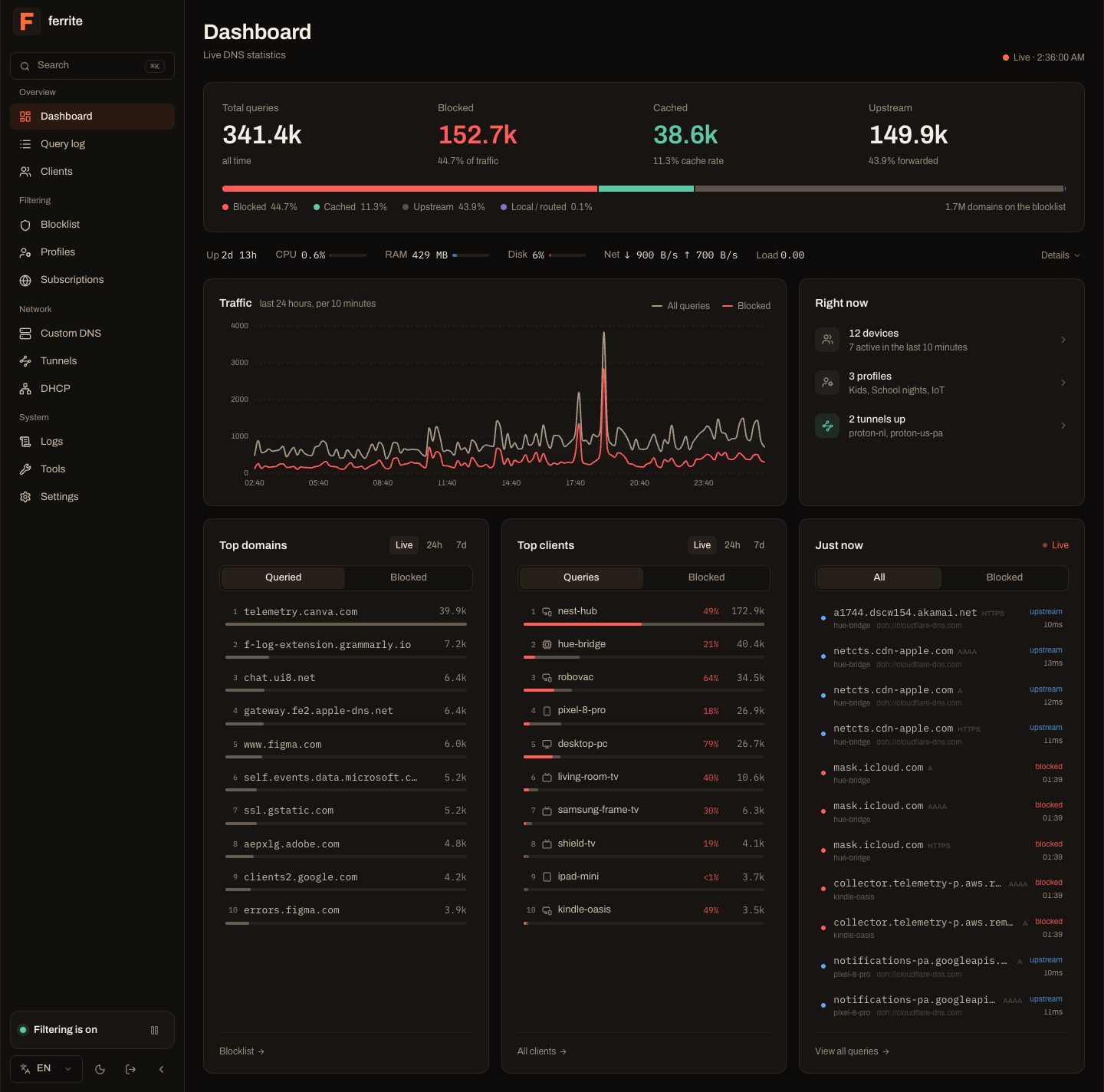
ferrite answers DNS for every device in the house. It blocks ads, trackers and malware for all of them, applies stricter rules to the devices that need them — a kid's tablet, a games console, the IoT corner — and sends the traffic you choose through WireGuard, SOCKS5 or Tor. Its panel shows what every device is doing and why each name was allowed, blocked or routed.
It runs as one process without root on anything from a Raspberry Pi to a NAS, and keeps everything it learns on that box.
Filtering for the whole network. Subscribe to blocklists and allowlists in hosts, Adblock or plain-domain format (a curated catalog is built in, or paste any URL); they compile into one compact lookup. Add your own block and allow entries — names, wildcards or regular expressions — block whole services network-wide, and turn on SafeSearch and YouTube Restricted Mode. Every verdict can be explained: which list, rule or service matched, and what exempted it.
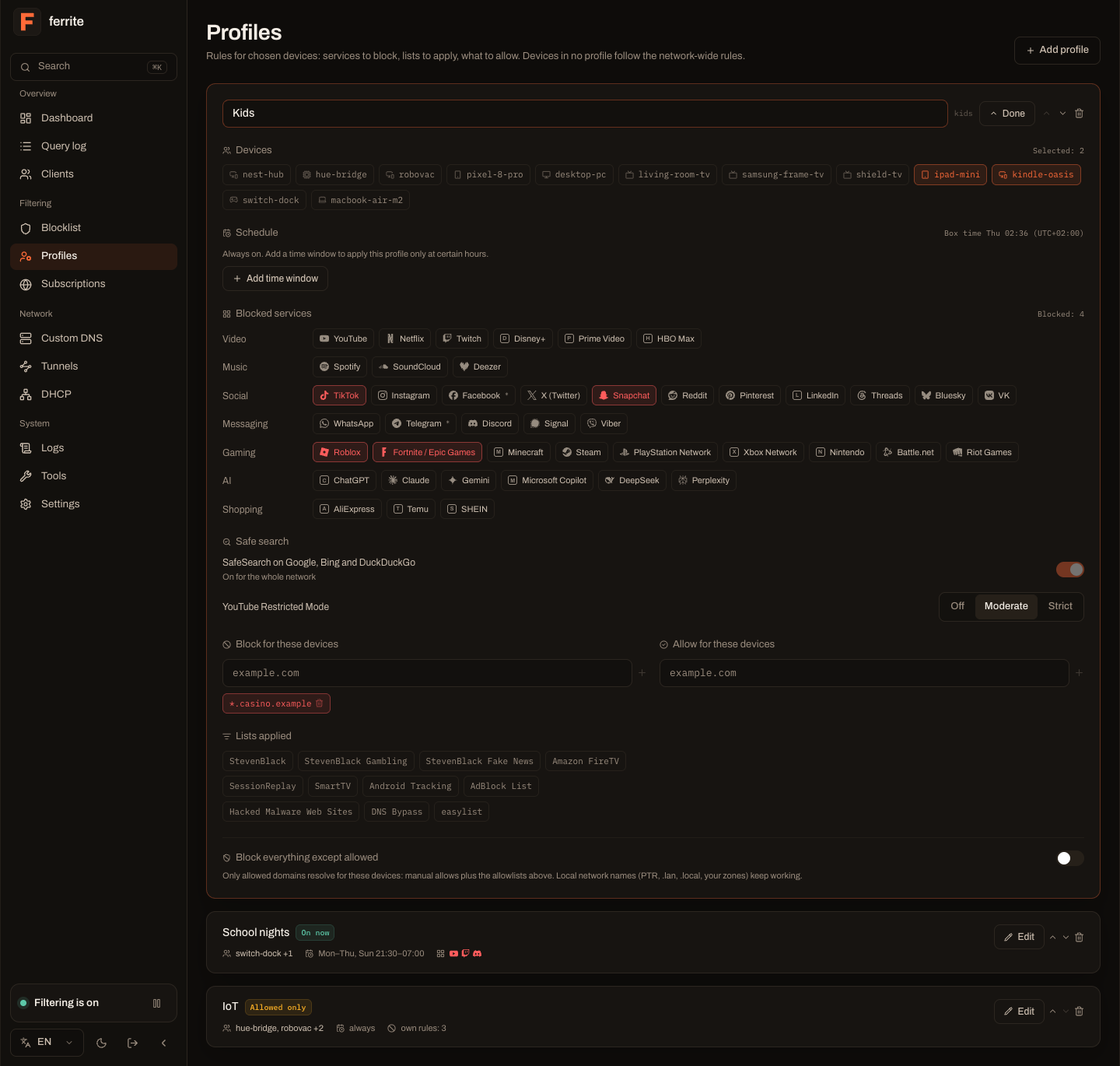
Rules per device. Profiles apply to chosen devices by MAC or IP:
- block services from a catalog of 43 — TikTok, Roblox, YouTube, Discord, Fortnite and more, in seven categories — with one click each;
- run on a weekly schedule ("school nights, 21:30–07:00");
- force SafeSearch and YouTube Restricted Mode;
- use a subset of the lists, plus their own block and allow entries;
- or flip to default-deny: only what is allowed resolves, while local names keep working.
Any device can be paused for a few minutes or exempted from filtering.
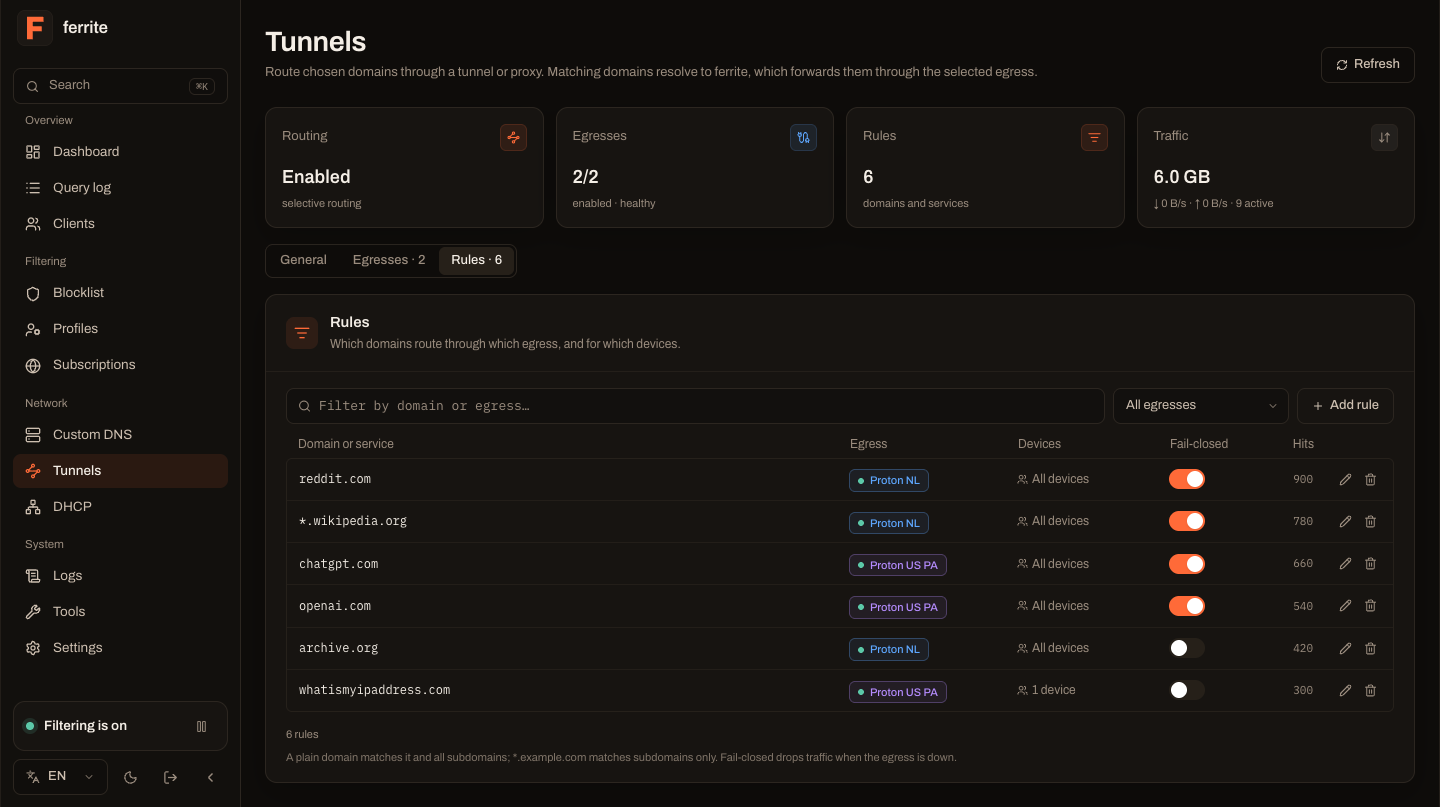
Routing through tunnels. Send a domain, a whole service or everything a
device does through an egress: built-in WireGuard (paste a .conf; the kernel
does the crypto when ferrite has CAP_NET_ADMIN, an in-process userspace
tunnel otherwise — no TUN device either way), SOCKS5 (point it at Tor), or
direct with TLS ClientHello fragmentation to get past DPI. Rules can be scoped to devices and fail closed when a tunnel is down.
Devices on encrypted DNS can be routed away from home too, with no VPN app:
their routed names point at the box's public address, which lets in only
your devices, and only for routed names.
ferrite reads the SNI or Host and never terminates TLS. Routing decides how
traffic leaves; blocking still decides whether a name resolves.
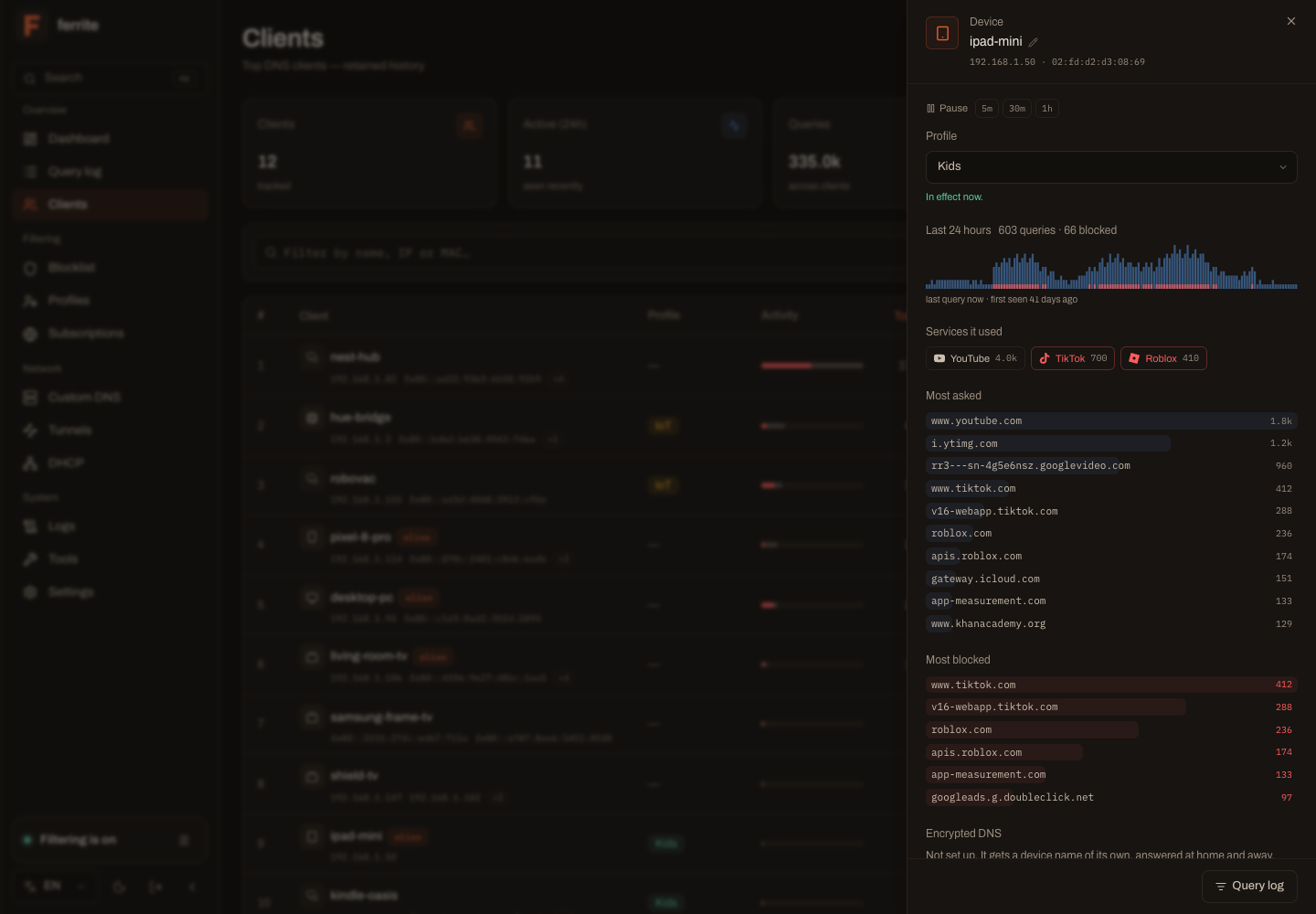
Seeing what happens. A live dashboard, a query log with device names, and a side panel for any domain or device: its verdict and why, a day of activity, the services behind it, the profile that governs it. Notifications go to ntfy, Telegram, Discord, Slack, Gotify or a JSON webhook when a tunnel stays down or a device the box has never seen joins the network.
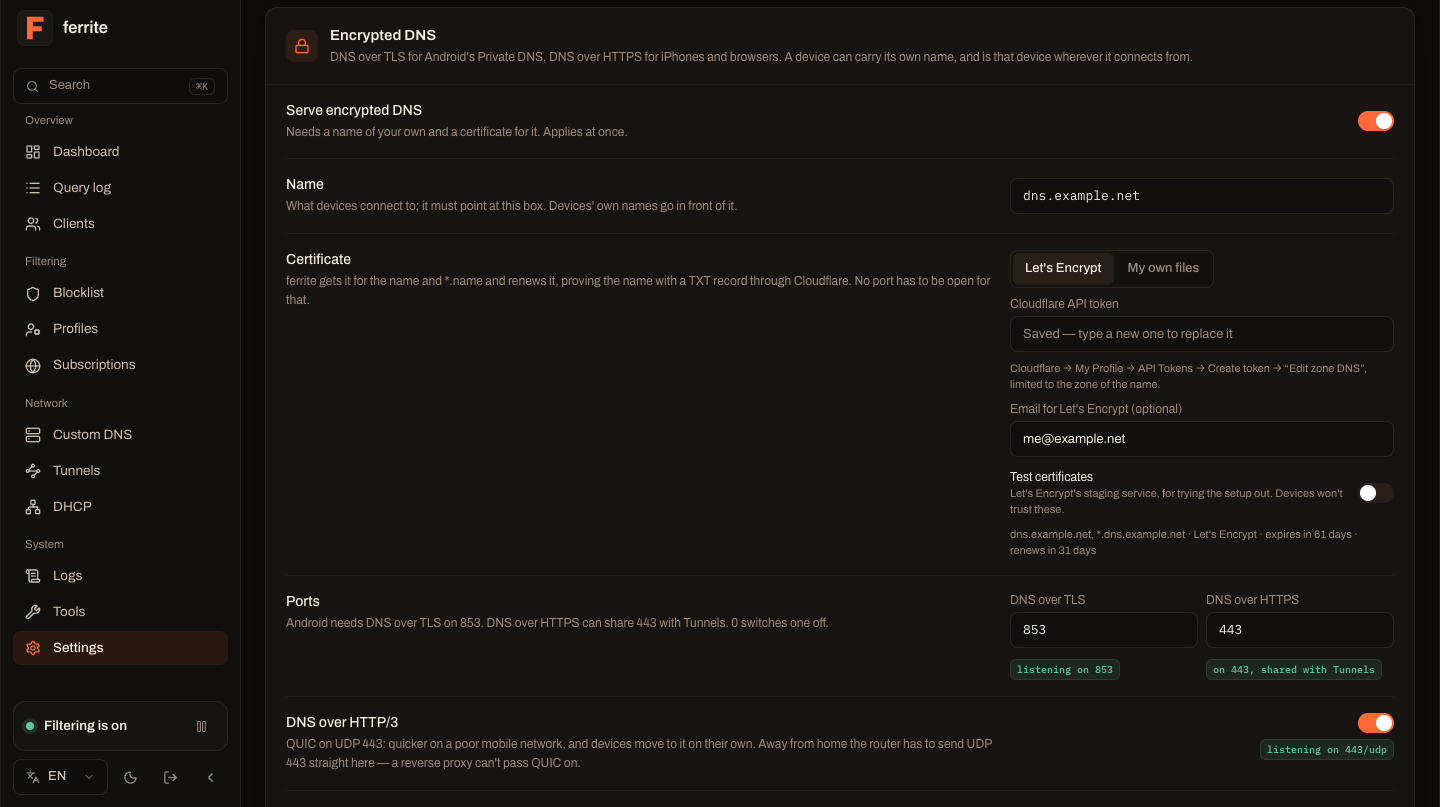
Encrypted DNS for your devices. Android's Private DNS (DNS over TLS) and
iPhones, Macs and browsers (DNS over HTTPS) can use ferrite at home and away.
Each device connects under its own name, so it keeps its profile wherever it
is. Give it a Cloudflare token and ferrite gets the certificate from Let's
Encrypt and renews it, with no port open for that; an iPhone or Mac sets
itself up from a profile, from a QR code in the panel or by opening the
panel's /setup page at home, with no password. DNS over HTTPS speaks
HTTP/3 too, shares 443 with Tunnels, or sits behind a reverse proxy such as
Nginx Proxy Manager. Apps that speak DNS over QUIC, such as AdGuard, get it on
the DNS over TLS port. From outside the house only the devices you list are
answered.
Keeping devices on the filter. Firefox is kept from switching to its own DNS over HTTPS, and iCloud Private Relay and Encrypted Client Hello can be turned off for the network. For routers that won't hand out another DNS server, ferrite can run DHCP itself (off by default), and every device it gives an address shows up under its own name.
Private DNS. Plain, DoT, DoH and DoQ upstreams in one pool with failover; an
upstream's queries can themselves ride a tunnel. EDNS Client Subnet is stripped,
DNSSEC is requested, local zones can be forwarded to your router, and custom
A / AAAA / CNAME records (exact or wildcard) answer first.
Two resolvers, one setup. A second ferrite can follow the first: it takes the chosen parts of its configuration — filtering, records, names, DNS settings — every few minutes, so devices given both resolvers get the same answers from either, and you edit in one place.
Coming from Pi-hole or AdGuard Home? Settings → System reads a Pi-hole v6
Teleporter export or an AdGuardHome.yaml and shows what comes over — lists,
rules, local records, groups and per-device settings, blocked services — and
what can't, before anything changes.
Automation. Everything the panel does is a REST API. Prometheus metrics at
/api/metrics, config export and import, self-update from the panel, and an
MCP endpoint: ask an AI assistant why Instagram doesn't work on the kids'
tablet and it reads what the tablet asked, finds the list, rule, service or
profile in the way and offers the fix. If you allow it, it also blocks and
allows, pauses, moves devices between profiles and routes names through
tunnels.
Small and fast. ~60 MB RSS on an ARM board serving 30 clients off a
1.8M-domain blocklist, sub-2 ms cache and block decisions, tens of thousands
of queries per second. Static musl binaries for x86_64 and aarch64,
a Docker image, and an Unraid template.
Images live in the web UI repo.
ferrite is a privacy tool first. What that means concretely:
- No telemetry, no analytics, no phone-home. The only outbound call ferrite makes on its own is an hourly GitHub check for updates (plus the blocklist fetches and notifications you configure). Nothing about your queries ever leaves the box.
- Your DNS, encrypted upstream. Plain, DoT, DoH, and DoQ upstreams in one pool. A resolver's queries can also ride a tunnel (DNS-over-TCP or DoT through an egress) — so your ISP sees only WireGuard, not your lookups.
- No client-subnet leak. EDNS Client Subnet is stripped from outgoing queries, so the upstream never learns the client's subnet.
- DNSSEC requested. The DO bit is set and signatures are forwarded; pair with a validating resolver over DoT/DoH for end-to-end integrity.
- No TLS interception. For routed domains ferrite peeks the SNI/Host but never terminates TLS — the client validates the real certificate end-to-end.
- Local, optional logging — and switchable off. The query log is SQLite on your disk. Retention is configurable, verbose logging is a toggle, and the query log and statistics each have their own on/off switch (Settings → Privacy). Turn both off and ferrite keeps filtering while recording nothing about what was resolved: no per-query rows, no top lists, no per-device history, no host names on the Tunnels page, and no cached domains in the restart snapshot — the one already written is rewritten the moment you flip the switch. What was recorded earlier is not served back either, and a reboot does not undo the choice. Clearing the log vacuums the database, so the freed pages actually leave the disk.
- No auth by default is loopback-only. The panel binds
127.0.0.1until you expose it; if you bind it to the LAN without a password, ferrite warns you.
Every query runs the shortest useful path, stopping at the first stage that can answer:
client ──▶ ferrite
            1. custom records   → local A / AAAA / CNAME answer
            2. blocklist        → blocked for this device? NXDOMAIN (or the answer you chose)
               2b. SafeSearch   → CNAME to the engine's safe host
            3. routing rule     → answer with ferrite's own IP (traffic goes through the tunnel)
            4. cache            → fresh? cached answer
            5. upstream         → DoT / DoH / DoQ / plain (round-robin + failover)
            6. CNAME check      → a blocked CNAME target blocks the answer too
The blocklist step is per device: a profile's own allow and block entries and its services come first, then the allowlists, then default-deny if the profile has it on, then the network-wide entries, services and lists. A profile outside its schedule steps aside until its window opens.
Tunnels. When a domain matches a routing rule, ferrite answers DNS with
its own LAN IP, so the client connects to ferrite. The listeners peek the
SNI (:443) or Host (:80) — without terminating TLS — re-match the
rule on the real hostname, and splice the connection through the chosen
egress:
| Egress | What it does |
|---|---|
direct |
Connect straight out (resolved via ferrite's upstream — no DNS leak). |
socks5 |
Forward through a SOCKS5 proxy (hostname sent as ATYP=domain). Point it at a local Tor (127.0.0.1:9050) to route over Tor. |
wireguard |
Built-in WireGuard — paste a .conf. Kernel-backed when allowed, userspace otherwise. DNS for routed names resolves through the tunnel. |
evasion |
Like direct, but splits the TLS ClientHello at the SNI across TCP segments so DPI can't read the hostname. |
Rules match a domain or a catalog service and can be scoped to specific devices (by name/MAC/IP) — route a kid's tablet through a tunnel while everything else goes direct. A blocklisted domain stays blocked even when a routing rule covers it (routing a service through a tunnel doesn't unblock its tracker subdomains); whitelist it to route it anyway. Rules, egresses and listener ports hot-reload — no restart.
Docker Compose (recommended — see docker-compose.yml in the repo root):
services:
  ferrite:
    image: ghcr.io/koroblabs/ferrite-server:latest
    container_name: ferrite
    restart: unless-stopped
    network_mode: host          # so ferrite sees real client IPs (see note below)
    cap_add: [NET_BIND_SERVICE]
    volumes:
      - ferrite-data:/var/lib/ferrite
volumes:
  ferrite-data:
# Docker — image on GHCR (not Docker Hub)
docker run -d --name ferrite \
--restart unless-stopped \
--network host \
--cap-add=NET_BIND_SERVICE \
-v ferrite-data:/var/lib/ferrite \
ghcr.io/koroblabs/ferrite-server:latestStatic binary. Every release ships musl binaries for x86_64 and aarch64
with a .sha256 next to each, so you can verify before running anything:
VER=v0.2.3; ARCH=$(uname -m)-unknown-linux-musl
BASE=https://github.com/koroblabs/ferrite-server/releases/download/$VER
curl -fsSLO $BASE/ferrite-$VER-$ARCH.tar.gz
curl -fsSL  $BASE/ferrite-$VER-$ARCH.tar.gz.sha256 | sha256sum -c -
tar -xzf ferrite-$VER-$ARCH.tar.gz && sudo install -m755 ferrite /usr/local/bin/ferrite
Install script — sets up a systemd/OpenRC service around that same binary. Read it before you run it; it is not piped into a shell here on purpose:
curl -fsSLO https://raw.githubusercontent.com/koroblabs/ferrite-server/main/install.sh
less install.sh          # see what it does
sudo sh install.sh
# From source (Rust 1.97+)
cargo build --release
cp target/release/ferrite /usr/local/bin/ferriteThen point your network's DNS (router DHCP, or per device) at the ferrite host,
open http://fe.te on the LAN, and set a password.
- The Docker image is a small Alpine runtime; mount
/var/lib/ferriteso config, data, and updates survive restarts. If port 53 fails to bind, add--cap-add=NET_BIND_SERVICE. - Prefer host networking. Per-device profiles and routing rules match on the
client's LAN IP/MAC — behind a Docker bridge every query arrives from the
gateway, so all your devices look like one. If you must use bridge mode, set
FERRITE_PANEL_IP=<host LAN IP>so thefe.teshortcut resolves, and publish443/tcpas well if you use selective routing or DNS over HTTPS, and853/tcpfor DNS over TLS. DHCP needs host networking. fe.teis a built-in DNS record pointing at the detected (or configured) server IP, so the panel is easy to find.
Config lives at ~/.config/ferrite/config.toml (user) or /etc/ferrite/config.toml
(system). The web UI is the primary editor — ferrite writes the file itself;
hand-editing is optional. With no config, ferrite starts with sane defaults (plain
UDP to 8.8.8.8/8.8.4.4, API on 127.0.0.1:8080).
[dns]
bind_addr = "0.0.0.0:53"
strip_ecs = true   # don't leak the client subnet upstream
dnssec    = true   # request DNSSEC (DO bit)

[api]
bind_addr = "0.0.0.0:8080"   # default 127.0.0.1 (loopback) — set a password before exposing
Upstreams (round-robin + failover). Each upstream may tunnel through an egress
via egress = "<id>" (plain/DoT only):
[[upstream]]
type = "plain"
address = "8.8.8.8"
port = 53

[[upstream]]
type = "tls"
address = "1.1.1.1"
port = 853
tls_name = "cloudflare-dns.com"

[[upstream]]
type = "https"
url = "https://cloudflare-dns.com/dns-query"
bootstrap_ip = "1.1.1.1"

[[upstream]]
type = "quic"
address = "94.140.14.14"
port = 853
tls_name = "dns.adguard-dns.com"
bootstrap_ipis needed for DoH when ferrite is the system resolver (it can't resolve the DoH hostname through itself). DoT/DoQ use a literal IP — no bootstrap.
Blocklists & allowlists — subscribe to any public list by URL (StevenBlack,
OISD, AdGuard, Hagezi…); formats (hosts / Adblock ||domain^ / plain) are
auto-detected and compiled into one fast FST. Allowlists work the same way in
reverse — subscribe to a community false-positive feed (e.g. anudeepND) and its
domains are never blocked; for Adblock-format lists the @@||domain^ exception
rules are the allow entries. Manage everything live in the UI.
[blocklist]
enabled = true
domains = ["*.doubleclick.net", "ads.example.com", '/^ads?[0-9]+\./']   # always blocked: names, wildcards, /regex/
client_bypass   = ["192.168.1.50", "aa:bb:cc:dd:ee:ff"]   # these clients skip filtering

[[blocklist.lists]]
name = "StevenBlack"
url  = "https://raw.githubusercontent.com/StevenBlack/hosts/master/hosts"
enabled = true

[allowlist]
domains = ["safe.example.com", "*.internal.corp"]   # never blocked (manual entries)

[[allowlist.lists]]
name = "anudeepND Whitelist"
url  = "https://raw.githubusercontent.com/anudeepND/whitelist/master/domains/whitelist.txt"
enabled = true
Per-device profiles — apply a subset of the block/allow subscriptions to
specific devices (by IP/MAC), with per-profile manual block/allow overrides. A
profile can also flip to default-deny: everything is blocked except what's
explicitly allowed. Local network names — PTR/reverse zones, .lan, .local,
your [[zones]] — stay resolvable automatically, no extra configuration.
[[blocklist.profiles]]
id = "iot"
name = "IoT Devices"
clients      = ["aa:bb:cc:dd:ee:ff"]
allowlists   = ["anudeepND Whitelist"]   # empty = all enabled allowlists apply
default_deny = true                      # block everything not explicitly allowed
A profile can also block catalog services, run on a schedule (box-local
time; a window may cross midnight) and force SafeSearch — the same three
exist network-wide under [blocklist]:
[[blocklist.profiles]]
id = "kids"
name = "Kids"
clients  = ["aa:bb:cc:dd:ee:01", "aa:bb:cc:dd:ee:02"]
services = ["tiktok", "roblox", "fortnite"]     # GET /api/services lists the catalog
safe_search = true
youtube_restricted = "moderate"                 # off | moderate | strict

[[blocklist.profiles.schedule]]                 # no windows = always on
days = ["sun", "mon", "tue", "wed", "thu"]
from = "21:30"
to = "07:00"
Custom records (take priority over blocklist + upstream):
[[custom_records]]
domain = "router.lan"
type = "A"
value = "192.168.1.1"
ttl = 300

[[custom_records]]
domain = "*.home.lan"
type = "A"
value = "192.168.1.100"
Selective routing — an egress + a rule. Paste a standard WireGuard .conf:
[proxy]
enabled = true
max_connections = 256
# advertise_ipv4 / advertise_ipv6 auto-detect when unset

[[proxy.egresses]]
id = "nl-proton"
name = "NL Proton"
enabled = true
kind = "wireguard"        # direct | socks5 | wireguard | evasion
buffer_kb = 512           # wireguard per-connection window (throughput vs RAM; 256–1024 KiB)
config = """
[Interface]
PrivateKey = <your key>
Address = 10.2.0.2/32
DNS = 10.2.0.1
[Peer]
PublicKey = <peer key>
Endpoint = 146.70.86.114:51820
AllowedIPs = 0.0.0.0/0
PersistentKeepalive = 25
"""

[[proxy.rules]]
pattern = "example.com"   # exact = domain + all subdomains; "*.example.com" = subdomains only
egress  = "nl-proton"
fail_closed = true        # if the egress is down, refuse rather than leak the connection directly
clients = []              # empty = all devices; or restrict by IP/MAC
A rule can name a catalog service instead of a pattern — service = "reddit" —
for every domain the service uses.
The HTTP listener is shared with the panel on :80 (demuxed by Host); TLS is
:443. Binding 80/443 needs privilege — ferrite already binds :53, so deploy
with CAP_NET_BIND_SERVICE.
Notifications — tunnel outages and new devices, shaped for the receiver:
[notifications]
webhook = "https://ntfy.sh/my-ferrite"
format  = "ntfy"          # json | ntfy | discord | slack | telegram (+ chat_id) | gotify
tunnel_alerts = true
new_device    = true
config.toml.example documents every key.
ferrite passwd # set a web UI password (Argon2id hash, stored in config)If neither a password nor an api_key is set, the API/panel is open — fine on
loopback, set a password before binding to the LAN (ferrite warns you if you
don't). A browser session lasts 7 days since it was last used and survives
restarts and updates; Settings → Access lists the signed-in browsers and signs
any of them out. Changing the password signs out every other session.
For scripts, set api_key and send Authorization: Bearer <key> or
X-Api-Key: <key>. A password login returns a session token too:
TOKEN=$(curl -s -X POST http://localhost:8080/api/auth \
        -H 'Content-Type: application/json' -d '{"password":"…"}' | jq -r .token)
curl -s http://localhost:8080/api/stats/summary -H "Authorization: Bearer $TOKEN"Everything in the web UI is this REST API — anything you do by hand, a script can
too. Base URL http://127.0.0.1:8080, all under /api, behind auth when
configured. The full reference is docs/API.md; the main groups:
/auth, /auth/sessions                 sign in and out, signed-in browsers
/stats/*, /queries, /logs, /metrics    counters, charts, the query log, server logs, Prometheus
/clients, /clients/{device}/stats      devices, names, one device in detail
/blocklist/*, /lists, /allowlists      entries, subscriptions, profiles, services, SafeSearch, why-blocked
/services                              the service catalog
/blocking/pause, /blocking/resume      pause filtering, box-wide or per device
/custom-records                        local DNS records
/proxy, /proxy/stats                   tunnels: egresses, rules, live counters
/notifications                         webhook target and events; a test send
/settings, /config/export|import       runtime settings, backup and restore
/tools/*                               DNS lookup, DNSSEC, WHOIS, certificate and reachability probes
/update/*                              update checks and self-update
/mcp                                   Model Context Protocol endpoint (off by default)
- Deployment & Docker, updates, service install → docs/DEPLOYMENT.md
- Build from source, the CI gate, contributing → docs/DEVELOPMENT.md
- Full guide & API reference → ferrite.me/docs · ferrite.me/api
- Web UI → ferrite-web
Configuration lives in config.toml and only there — settings, subscriptions,
manual block/allow entries, profiles, custom records, client aliases, tunnels,
notifications. Everything the UI changes is written straight back to it, so
backing up that one file backs up the whole setup. The database holds what
ferrite observed (the query log, the device inventory and when each device was
first seen) and the panel's login sessions: delete it and you lose history and
have to sign in again, never configuration.
All under ~/.local/share/ferrite/:
| File | Contents |
|---|---|
ferrite.db |
SQLite — query log, rollups, device inventory, login sessions |
(absent entirely with storage.backend = "memory") |
|
blocklist.fst |
Compiled blocklist (rebuilt on list changes) |
allowlist.fst |
Compiled subscribed allowlists |
lists/<name>.* |
Per-blocklist parsed-domain cache |
allowlists/<name>.* |
Per-allowlist parsed-domain cache |
state.bin |
Warm-restart snapshot (DNS cache + counters) |
web/ |
Web UI static files |
MIT