You signed in with another tab or window. Reload to refresh your session.You signed out in another tab or window. Reload to refresh your session.You switched accounts on another tab or window. Reload to refresh your session.Dismiss alert
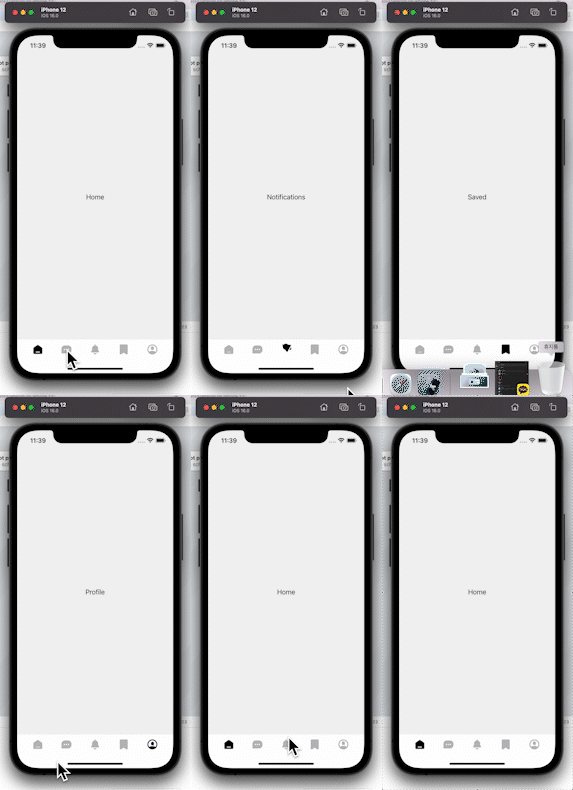
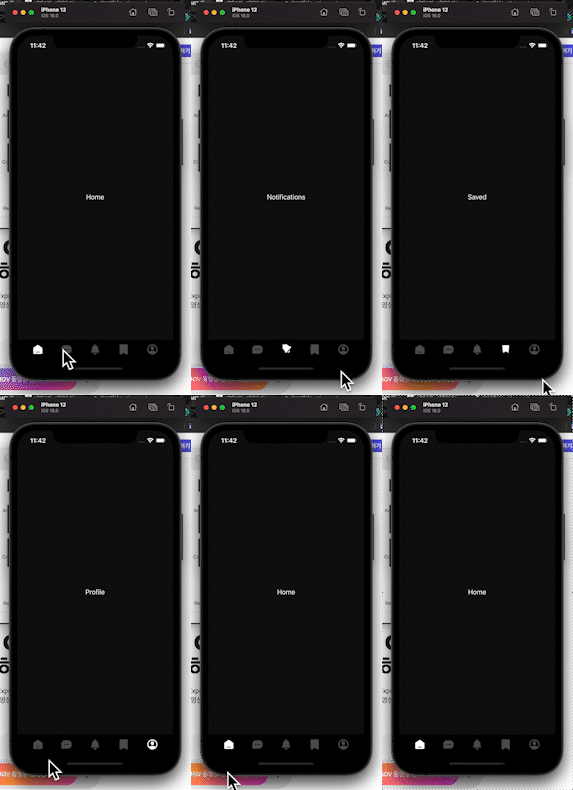
Lottie는 JSON 형식의 파일을 벡터 기반 애니메이션으로 실시간 렌더링하는 모바일 라이브러리.
라이트 모드, 다크모드 일때 색을 다르게 보여줌
코드
AnimatedIcon
문법
Lottie : Lottie는 JSON 형식의 파일을 벡터 기반 애니메이션으로 실시간 렌더링하는 모바일 라이브러리. Lottie를 사용해서 애니메이션의 재생, 크기 조정, 루프 적용, 속도 향상, 속도 감소, 역회전 및 대화형 스크러빙 하는 것이 가능하고, 애니메이션의 일부만 재생하거나, 반복할 수 있고 또한 Lottie는 UIView 컨트롤러 전환을 지원
Identifiable : 객체 안에 id를 지정해주어 사용할 때 정확히 불러올 수 있게해줌
enum : 연관된 값들의 집합을 공통된 타입으로 정의. 열거형 , 하나의 자료형을 만들어줌
case : enum에서 사용되고 모두 독립적인 값이지만 내부에 또다른 값을 저장
모든 케이스가 동일한 형식을 사용
케이스당 값을 하나밖에 저장할 수 없음
CaseIterable : allCases 라는 타입 속성을 얻는다.
연관 값을 가지지 않거나, @available 속성을 가진 case가 없는 열거형이어야만 CaseIterable을 사용할 수 있습니다
importSwiftUI
// Mark: Tab Model
enumTab:String,CaseIterable{casehome="Home"casechat="Chat"casenotifications="Notification"casesaved="Saved"caseaccount="Account"}
MainView
문법
UITabBar : 하단모서리에 위치하고 TabBar를 생성하게되면 목록을 추가 , 삭제 ,변경 선택에 대한 응답을 제어하기 위해서는 delegate가 필요하다
앱의 모드를 관리하고, 앱 전체와 관련이 있다.
appearance : 클릭되었을때와 안되었을때를 구분
isHidden : View를 숨길지 말지 결정하는 값
allCases : 모든 타입이 담겨진 배열
append : 배열 추가
.init : 특정 타입의 인스턴스를 생성
rawValue : enum을 사용해서 열거형을 만들어줄 때 String타입이면 입력해줘야함
bundle : 실행코드,이미지,소리같은 자원(resource)를 한공간에 그룹 ( 파일들의 모음)
@Environmnet : 프로퍼티 래퍼
colorScheme : light mode , dark mode를 지원
@ViewBuilder : Child View를 구성한다. 나만의 View를 만들 수 있음
ForEach : Struct구조 , 항목 배열을 제공, 각 항목을 고유하게 식별하여 값이 변경될때 업데이트하는 방법을 알수 있음. 루프의 각 항목에 대한 뷰를 생성하기 위해 실행한 클로저를 전달
aspectRatio : 화면 비율
frame : 크기
contentShape : 모양정의
importSwiftUIimportLottiestructMainView:View{init(){UITabBar.appearance().isHidden=true}
// Mark : View Properties
@StatevarcurrentTab:Tab=.home@StatevaranimatedIcons:[AnimatedIcon]={vartabs:[AnimatedIcon]=[]fortabinTab.allCases{tabs.append(.init(tabIcon:tab,lottieView:AnimationView(name:tab.rawValue,bundle:.main)))}returntabs}()@Environment(\.colorScheme)varschmevarbody:someView{VStack(spacing:0){TabView(selection:$currentTab){Text("Home").setBG().tag(Tab.home)Text("Messages").setBG().tag(Tab.chat)Text("Notifications").setBG().tag(Tab.notifications)Text("Saved").setBG().tag(Tab.saved)Text("Profile").setBG().tag(Tab.account)}
// ios 16 update
if#available(iOS16,*){TabBar().toolbar(.hidden,for:.tabBar)}else{TabBar()}}}@ViewBuilderfuncTabBar()->someView{HStack(spacing:0){ForEach(animatedIcons){iconinlettabColor:SwiftUI.Color=currentTab==icon.tabIcon?(schme==.dark?.white:.black):.gray.opacity(0.6)ResizableLottieView(lottieView:icon.lottieView,color:tabColor).aspectRatio(contentMode:.fit).frame(width:30,height:30).frame(maxWidth:.infinity).contentShape(Rectangle()).onTapGesture{
// updating current tab&playing animation
currentTab=icon.tabIconicon.lottieView.play{_in
// todo
}}}}.padding(.horizontal).padding(.vertical,10).background{(schme==.dark?Color.black:Color.white).ignoresSafeArea()}}}structMainView_Previews:PreviewProvider{staticvarpreviews:someView{ContentView()}}extensionView{@ViewBuilderfuncsetBG()->someView{self.frame(maxWidth:.infinity,maxHeight:.infinity).background{Color.primary.opacity(0.05).ignoresSafeArea()}}}
ResizableLottieView
문법
UIViewRepresentable : UIView 를 생성하고 관리
makeUIView : view를 만들고 초기상태 구성
UIView : View를 관리
backgroundColor : 뒷배경 색
importSwiftUIimportLottie
//Mark : Resizable Lottie View
structResizableLottieView:UIViewRepresentable{varlottieView:AnimationViewvarcolor:SwiftUI.Color=.blackfuncmakeUIView(context:Context)->UIView{letview=UIView()view.backgroundColor=.clearaddLottieView(to:view)returnview}funcupdateUIView(_uiView:UIView,context:Context){
// 색 업데이트
// Finding Attached Lottie View
ifletanimationView=uiView.subviews.first(where:{viewinview is AnimationView})as?AnimationView{
// mark : finding keypaths with the help of log
// key may be changed based on Lottie File
// use log to find appropriate key
//lottieView.logHierarchyKeypaths()
letlottieColor=ColorValueProvider(UIColor(color).lottieColorValue)
// Mark : Fill key Path
letfillKeyPath=AnimationKeypath(keys:["**","Fill 1","**","Color"])animationView.setValueProvider(lottieColor,keypath:fillKeyPath)
// MARK: Stroke Key Path
letstrokeKeyPath=AnimationKeypath(keys:["**","Fill 1","**","Color"])animationView.setValueProvider(lottieColor,keypath:strokeKeyPath)}}funcaddLottieView(to:UIView){/// mark: memory proertieslottieView.backgroundBehavior=.forceFinishlottieView.shouldRasterizeWhenIdle=truelottieView.backgroundColor=.clearlottieView.contentMode=.scaleAspectFitlottieView.translatesAutoresizingMaskIntoConstraints=falseletconstraints=[lottieView.widthAnchor.constraint(equalTo:to.widthAnchor),lottieView.heightAnchor.constraint(equalTo:to.heightAnchor)]to.addSubview(lottieView)to.addConstraints(constraints)}}