
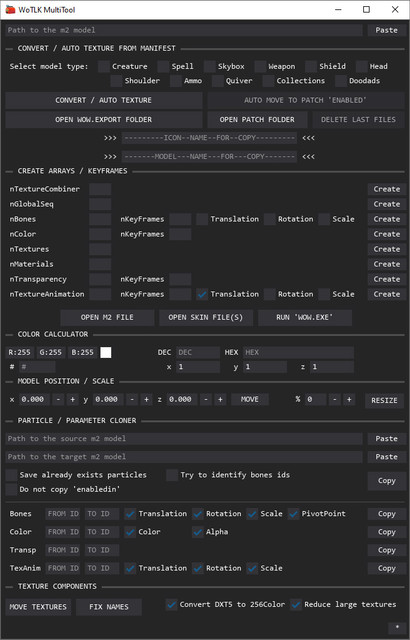


Converts the model, automatically renames LOD files, edits the number of nViews, corrects GlobalSequences, corrects helmet misalignment, assigns textures, if they're scattered across folders and consolidates them into one folder, collects skin and anim files, moves them to the patch folder, and removes junk files after exporting from wow.export. Generates a model name and icon name for insertion into the dbc table, taking into account the model type and race (if it's a helmet model).
Instantly creates n-th number of blocks (Color, Bones, Textures, Transparency and others) with a specified number of Timestamps and Values. No more manually fiddling with bytes and offsets.
Converts various color formats: hex# is used in graphic editors, DEC (decimal) is used in LightIntBand.dbc, HEX (hexadecimal) is used in 010Editor in the Color block.
Allows you to shift the model along the x, y, z axes (for example, offsetting helmets) and change the model's size. Offset and scale work with any model, even animated ones, and don't cause vertex collapse (possibly the only way to change the size of Warlock pets).
Full copying of particles from one model to another. Simple copying of complex structures with all nested parameters (Bones, Color, Transparency, TextureAnimation)
A module for working with textures. It will move all exported textures from the wow.export folder to the patch folder, with the option to automatically convert from DXT5 to Indexed (256Color). It will automatically remove extra digits from texture names.
python -m nuitka --standalone --onefile --onefile-tempdir-spec="{TEMP}/WoTLK_Multitool_Data" --windows-console-mode=disable --no-deployment-flag=excluded-module-usage --remove-output --include-data-files=C:\Users\User_name\PycharmProjects\WoTLK_MultiTool\ICO.ico=multitool.ico --include-package=comtypes --nofollow-import-to=*.test,comtypes.gen,cv2,cryptography,numpy,tkinter,pydoc --windows-icon-from-ico=C:\Users\User_name\PycharmProjects\WoTLK_MultiTool\ICO.ico C:\Users\User_name\PycharmProjects\WoTLK_MultiTool\WoTLK_MultiTool.py --output-dir=C:\Users\User_name\Desktop