

Reasoning-based RAG ◦ No Vector DB, No Chunking ◦ Context-Aware Retrieval ◦ Reads Like a Human
🌐 Website • ☁️ Cloud • 📖 Docs • 📝 Blog • ✉️ Contact
- [Oct '26] 🔥 Page Search API: find the pages that answer each question in about a second, and send your LLM only those. Cut 97% token cost on document question answering; more accurate and faster than vector search (benchmark).
- [Aug '26] PageIndex SDK: local and cloud modes — one client to index, retrieve, and chat on your machine (with your own LLM API key) or on PageIndex Cloud.
- [Aug '26] ⚡ PageIndex Flash: fast tree index generation for text-based PDFs, now the default indexing method in PageIndex SDK local mode.
- Scale PageIndex to Millions of Documents: PageIndex File System is a file-level tree indexing layer that lets PageIndex reason over an entire corpus, not just a single document.
- PageIndex App: a human-like document analysis agent for long professional documents.
Are you frustrated with vector database retrieval accuracy for long and complex documents? Vector-based RAG retrieves by semantic similarity. But similarity ≠ relevance — what retrieval actually needs is relevance, and relevance requires reasoning. On professional documents that demand contextual understanding, domain expertise, and multi-step reasoning, similarity search misses what is relevant but not similar, and returns what is similar but not relevant.
Inspired by AlphaGo, PageIndex replaces the vector index with a hierarchical tree index and lets an LLM reason its way through it, the way a human expert turns to and reads the right section of a long report. Retrieval happens in two steps:
- Index: generate a tree-structure index for each document
- Retrieve: agentically search that tree with LLM reasoning

PageIndex is a vectorless, reasoning-based RAG engine that mirrors how humans read, delivering traceable, explainable, and context-aware retrieval, with no vector DBs or chunking.
| Vector RAG | PageIndex | |
|---|---|---|
| Index | vector index | tree index |
| Retrieval | semantic similarity search | LLM reasoning over the tree |
| Result | opaque, “vibe retrieval” | traceable to explicit references |
| Context | query embedding only | full context: conversation history, domain knowledge, etc. |
It is ideal for financial reports, legal documents, regulatory filings, technical manuals, medical literature, academic textbooks, and any other long, complex professional document.
pip install -U pageindeximport os
from pageindex import PageIndexClient
os.environ["OPENAI_API_KEY"] = "your-openai-key"
client = PageIndexClient(
index="gpt-6-luna", # model to build the tree index
chat="gpt-6.2-sol", # model to search the tree
)
doc_id = client.submit_document("report.pdf")["doc_id"]
answer = client.chat("What was the 2023 operating margin?", doc_id=doc_id)
print(answer)index=: a basic model is sufficient. The tree structure itself is extracted from the document layout without an LLM; the index model only summarizes and refines it, which a basic model does well.chat=: use the best model you can afford. The chat model searches the tree to retrieve information. See Query cost and accuracy.
Have a Claude subscription? PageIndex can use your subscription to call Claude models through Claude Code: usage is covered by your plan, no API key needed. Install with pip install -U "pageindex[claude]", then prefix model names with claude-code/, e.g., index="claude-code/haiku", chat="claude-code/opus" (see example).
Run PageIndex on your machine, step by step. Each step builds on the one before.
Install and initialize
pip install -U pageindeximport os
from pageindex import PageIndexClient
os.environ["OPENAI_API_KEY"] = "your-openai-key"
client = PageIndexClient(
index="gpt-6-luna", # model to build the tree index
chat="gpt-6.2-sol", # model to search the tree
)Models and API keys
index=: a basic model is sufficient. The tree structure itself is extracted from the document layout without an LLM; the index model only summarizes and refines it, which a basic model does well.chat=: use the best model you can afford. The chat model searches the tree to retrieve information. See Query cost and accuracy.
Model names follow LiteLLM's naming. The two models can come from different providers; set the API key of each provider you use:
| Provider | index= |
chat= |
API key |
|---|---|---|---|
| OpenAI | gpt-6-luna |
gpt-6.2-sol |
OPENAI_API_KEY |
| Anthropic | anthropic/claude-haiku-5-5 |
anthropic/claude-opus-5-5 |
ANTHROPIC_API_KEY |
| OpenRouter | openrouter/anthropic/claude-haiku-5-5 |
openrouter/anthropic/claude-opus-5-5 |
OPENROUTER_API_KEY |
| Claude subscription | claude-code/haiku |
claude-code/opus |
none; install pageindex[claude] (example) |
Leave out index=, and indexing uses gpt-6-luna, which needs OPENAI_API_KEY. For other providers, see the LiteLLM provider list.
Indexed documents are kept in ./.pageindex. To keep them elsewhere, pass the index side as a dict: index={"model": "gpt-6-luna", "storage_path": "my-index"}.
doc_id = client.submit_document("report.pdf")["doc_id"]submit_document indexes with PageIndex Flash: the structure comes from the PDF's own layout, without an LLM, and the index model only writes node summaries and refines the tree.
Local mode (PageIndex Flash) works with text-based PDFs. For scanned files and image understanding, use PageIndex Cloud.
Read and manage your documents
Read what you indexed:
tree = client.get_document_structure(doc_id)    # titles, page ranges, summaries; no text
pages = client.get_page_content(doc_id, "5-7")  # the text of pages 5 to 7
docs = client.list_documents()                  # every indexed document
To remove a document, call client.delete_document(doc_id).
A PageIndex tree looks like a table of contents optimized for LLMs and agents:
See more example documents and generated tree structures.
Ask with your own LLM, or with an agent you already have.
chat() runs PageIndex's agent on your LLM: it finds the right pages, then writes the answer.
answer = client.chat("What changed in the risk factors?", doc_id=doc_id)Citations
Pass citations=True, and every claim cites its page:
cited = client.chat("Summarize this document.", doc_id=doc_id, citations=True)
# Revenue increased during the reporting period. <cite doc="report.pdf" page="12"/>citations="markdown" writes [report.pdf, p. 12] instead. To show the citations, resolve_citations() turns the tags into numbered links and lists the sources:
resolved = client.resolve_citations(cited)
print(resolved["answer"])
# Revenue increased during the reporting period. [[1]](#pageindex-citation-01)
for c in resolved["citations"]:
print(c["index"], c["document"], c["page"])
# 1 report.pdf 12Streaming
The stream shows the agent's thinking and tool calls as it works; pass show_process=False to stream only the answer:
for chunk in client.chat("Summarize this document.", doc_id=doc_id, stream=True):
print(chunk, end="", flush=True)Protocols (Chat Completions / Responses / Messages)
protocol= returns the response in that API's own shape: "chat_completions" or "responses" (OpenAI), or "messages" (Anthropic, with a Claude model):
response = client.chat("Summarize this document.", doc_id=doc_id, protocol="responses")
print(response["output"])Conversations and multiple documents
Continue a conversation. Pass the messages so far in place of the question:
messages = [
{"role": "user", "content": "What changed in the risk factors?"},
{"role": "assistant", "content": answer},
{"role": "user", "content": "Which of these changes matters most?"},
]
answer = client.chat(messages, doc_id=doc_id)Ask across documents. Index another document, then pass a list of IDs, and keep the same list for every call in a conversation. Leave out doc_id to search every indexed document:
doc_id_2022 = client.submit_document("report-2022.pdf")["doc_id"]
answer = client.chat("How did the operating margin change from 2022?", doc_id=[doc_id, doc_id_2022])Your agent keeps its own model and gets PageIndex's tools to find and read your indexed documents, so the client needs no chat= here. Name the documents in a first message and put the question in a second:
instructions = client.agent_instructions() # PageIndex's system prompt, or write your own
messages = [
{"role": "user", "content": client.document_context(doc_id)}, # one ID or a list
{"role": "user", "content": "What are the auditor's main concerns?"},
]Leave out the first message to let the agent look across every indexed document. The context guides the agent; it is not a lock.
Pass instructions, PageIndex's tools, and messages to your agent framework:
OpenAI Agents SDK
Ships with the SDK, no extras needed:
from agents import Agent, Runner
agent = Agent(
name="PageIndex",
instructions=instructions,
tools=client.as_openai_tools(),
model="gpt-6.2-sol",
)
result = Runner.run_sync(agent, messages)
print(result.final_output)Anthropic SDK
Install with pip install -U "pageindex[anthropic]":
import anthropic
runner = anthropic.Anthropic().beta.messages.tool_runner(
model="claude-opus-5-5",
max_tokens=16000,
system=instructions,
tools=client.as_anthropic_tools(), # asynchronous=True for AsyncAnthropic
messages=messages,
)
final = runner.until_done()
print("".join(block.text for block in final.content if block.type == "text"))Claude Agent SDK
Install with pip install -U "pageindex[claude]":
import asyncio
from claude_agent_sdk import ClaudeAgentOptions, ResultMessage, query
options = ClaudeAgentOptions(
model="claude-opus-5-5",
system_prompt=instructions,
mcp_servers={"pageindex": client.as_claude_mcp()},
allowed_tools=["mcp__pageindex"],
)
async def input_messages():
for message in messages:
yield {"type": "user", "message": message,
"parent_tool_use_id": None, "session_id": ""}
async def main():
async for message in query(prompt=input_messages(), options=options):
if isinstance(message, ResultMessage):
print(message.result)
asyncio.run(main())Other agent frameworks
tools = client.agent_tools()These are plain Python functions for LangChain, PydanticAI, or any other framework. Each takes JSON arguments and returns a JSON string. Give them and instructions to your agent, and pass messages as the conversation.
Citations
Add the citation prompt to the instructions, and the agent cites each claim's page in the same tags as chat(citations=True). Read them with resolve_citations(), as in Citations under With your LLM:
instructions = client.agent_instructions() + "\n\n" + client.citation_prompt()Document management
The tools only read by default. Pass include_management=True to both agent_instructions() and the tool method, such as as_openai_tools(), to also let the agent delete documents.
One-call setup
These helpers return the instructions and tools together, in place of the setup above:
agent = Agent(**client.openai_agent_config(model="gpt-6.2-sol"))
runner_config = client.anthropic_runner_config(model="claude-opus-5-5")
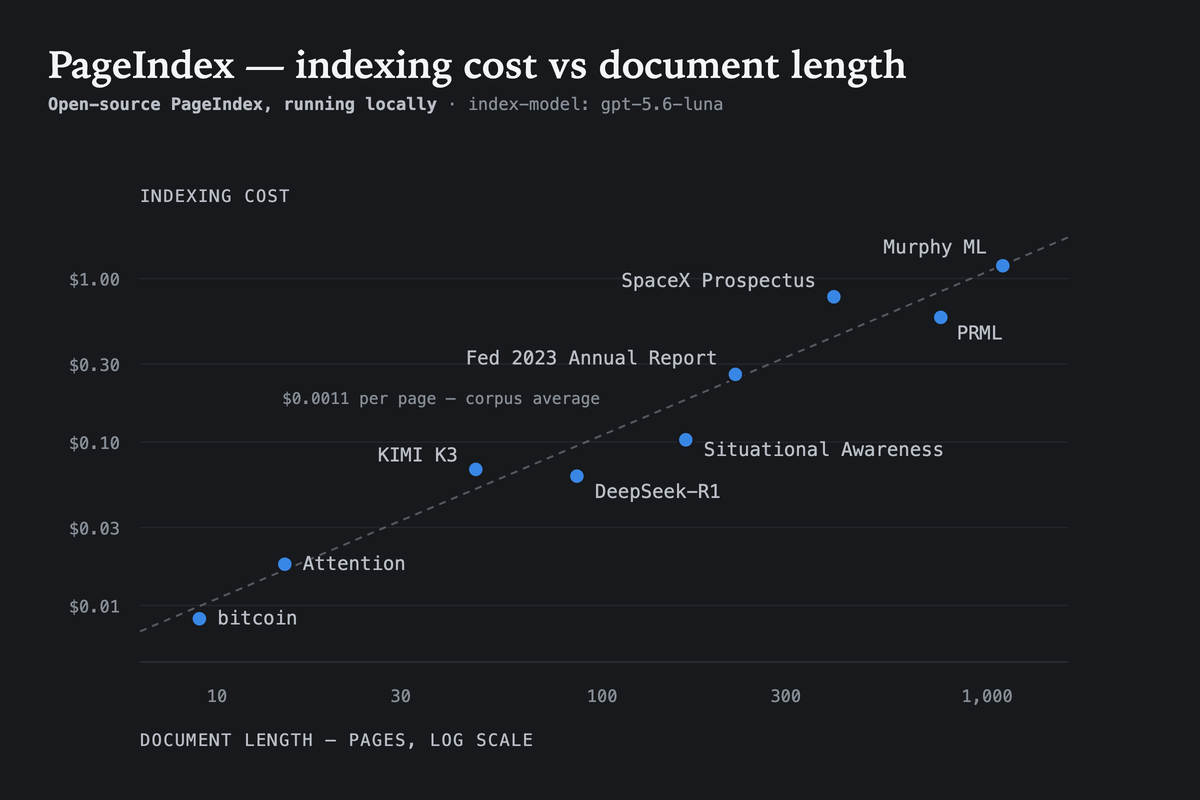
options = ClaudeAgentOptions(**client.claude_agent_config(model="claude-opus-5-5"))Building a tree locally runs about $0.001 per page with gpt-5.6-luna as the index model, so a 1,000-page textbook costs a little over a dollar and a few minutes, once, and every later question reuses it. PageIndex is designed not to rely heavily on the model used at index time, so in our experiments a basic model does not hurt quality.
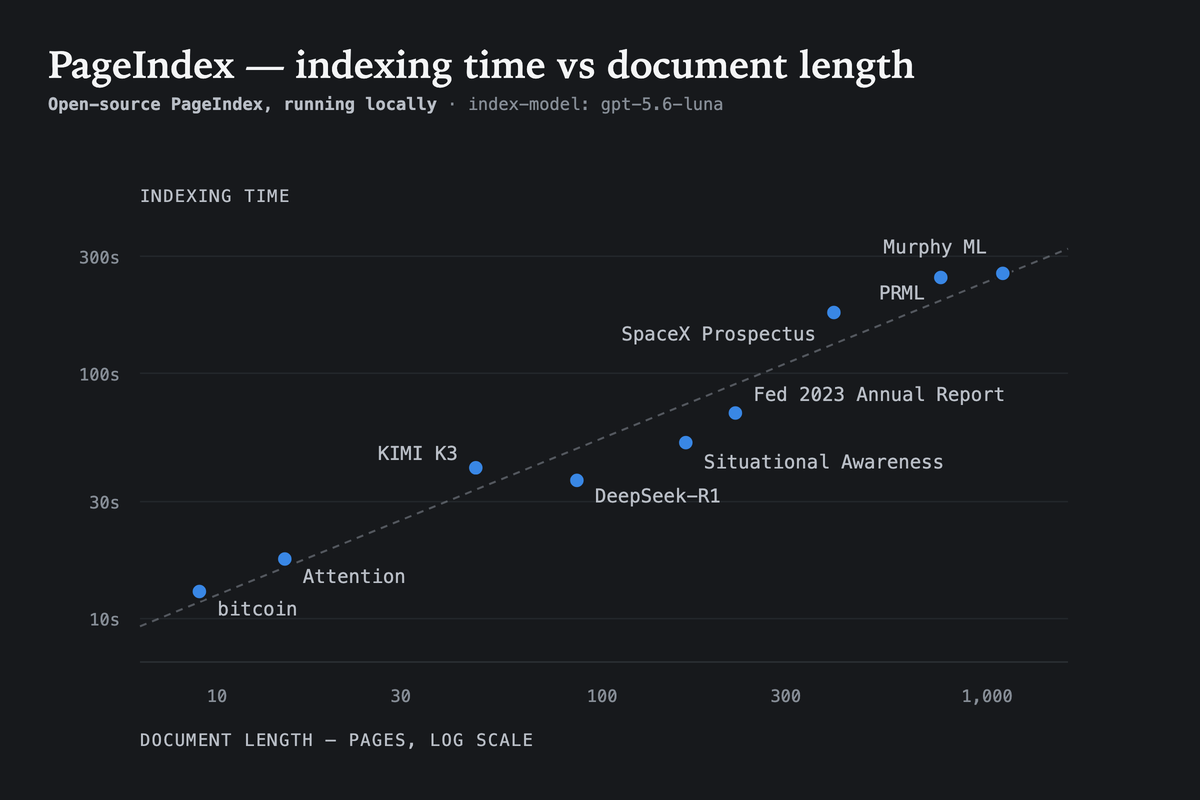
Indexing time also scales predictably with document length. In the same local setup, the benchmark documents (9 to 1,098 pages) finished in roughly 13 seconds to 4.5 minutes.
PageIndex Financial QA Benchmark compares the accuracy and query cost of 34 configurations of 19 LLMs answering 100 questions over 40 Form 10-K filings from 8 companies, with PageIndex doing the retrieval. Cost is measured per 100-question run and excludes one-time indexing.
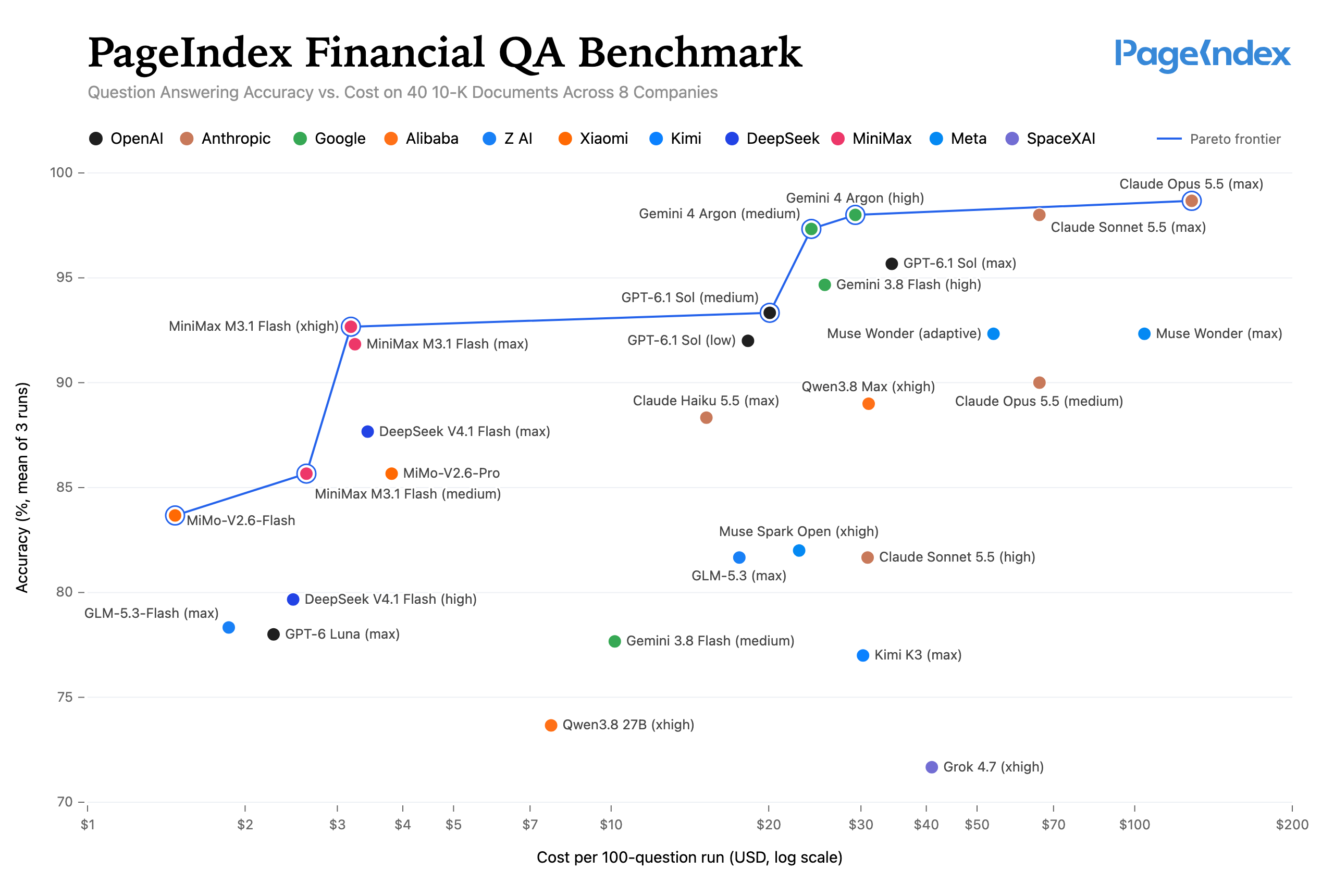
Full results, data, and reproduction instructions are in the benchmark repo.
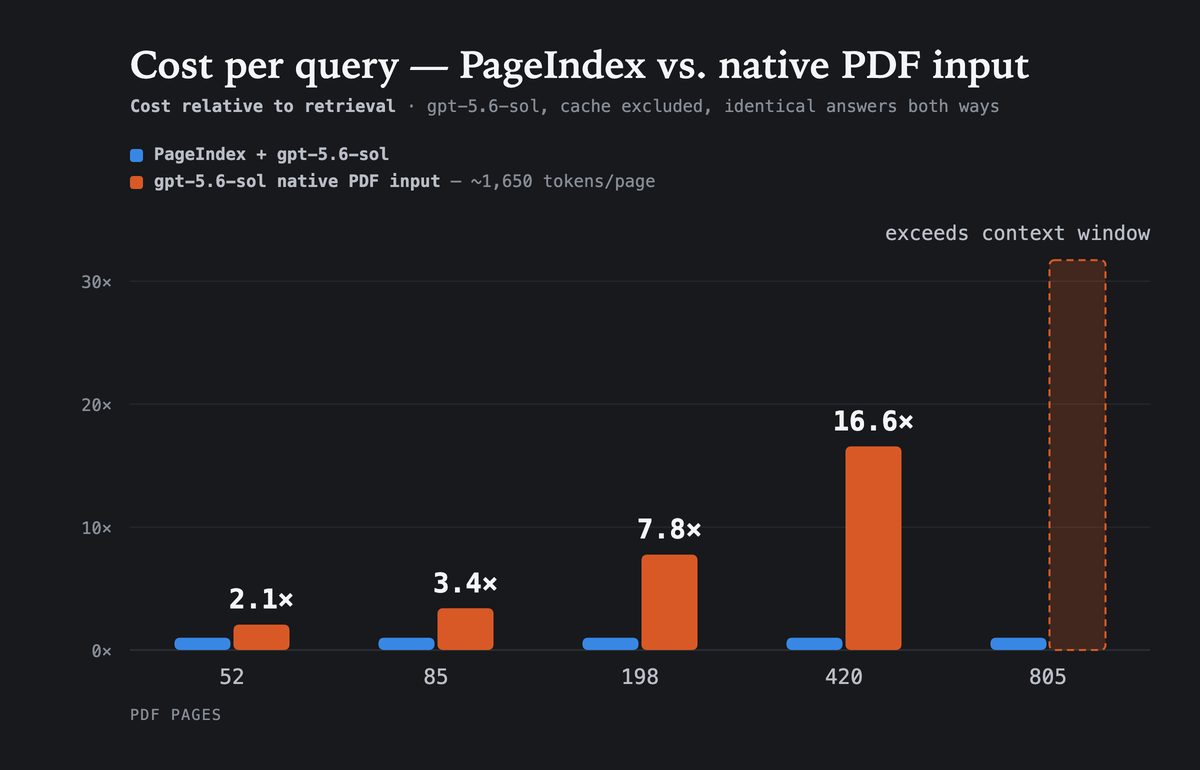
The alternative to retrieval is handing the model the whole PDF on every question. That cost grows with the document; PageIndex's does not, because it reads only the nodes its reasoning reaches. On documents where both routes return the same answer, native PDF input costs 2.1× more at 52 pages and 16.6× more at 420 (gpt-5.6-sol, prompt caching excluded) — and at 805 pages the document no longer fits in the context window at all.
PageIndex reached a state-of-the-art 98.7% accuracy on FinanceBench (financial document QA benchmark), vastly outperforming vector-based RAG.
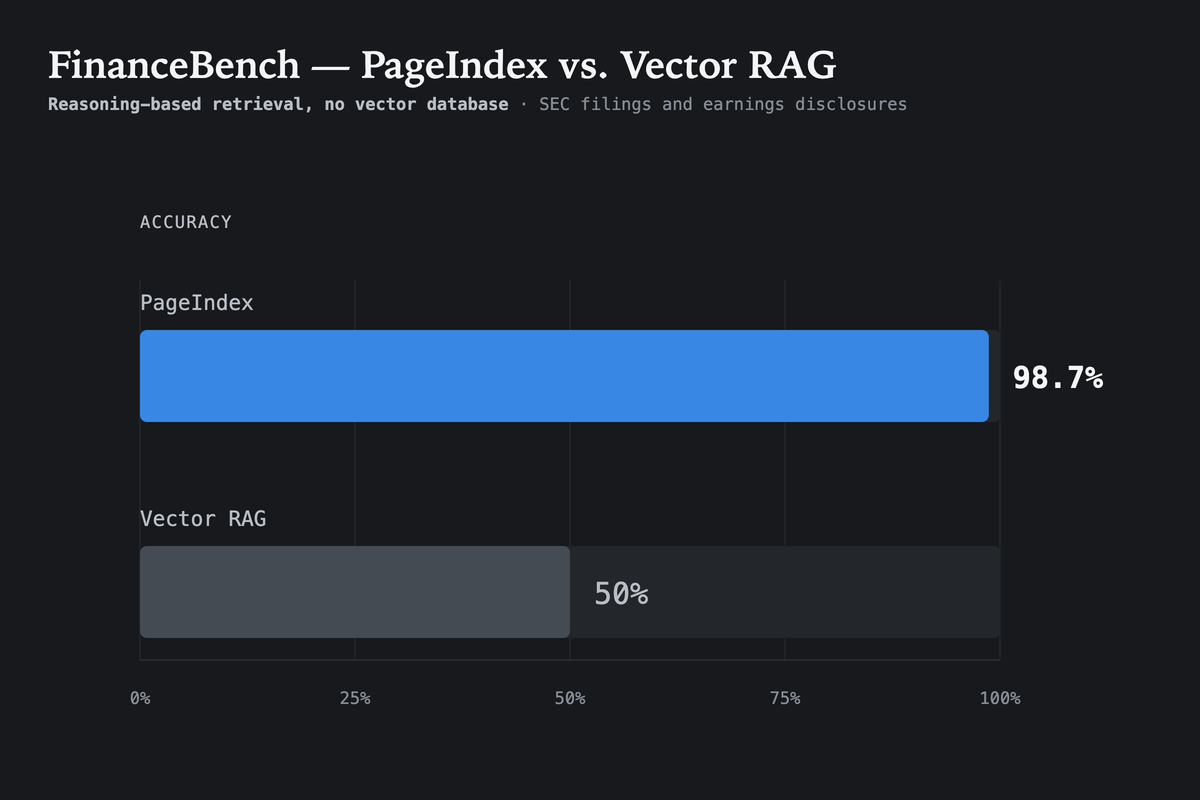
Explore the full FinanceBench evaluation results and the blog post.
The open-source version is ideal for text-heavy PDFs and local workflows. With PageIndex Cloud, document indexing and storage run in the cloud: PageIndex handles parsing, image understanding, tree-index construction, and managed storage for you. The chat and retrieval layer remains compatible with your model, so you can search the cloud-hosted index using the model provider your application already uses.
Moving indexing and storage from Local to Cloud only requires a PageIndex API key:
import os
from pageindex import PageIndexClient
os.environ["PAGEINDEX_API_KEY"] = "your-pageindex-key"
os.environ["OPENAI_API_KEY"] = "your-openai-key"
client = PageIndexClient(
index="cloud", # build and store the index in PageIndex Cloud
chat="gpt-6.2-sol", # use your preferred compatible model for chat
)
doc_id = client.submit_document("report.pdf", wait=True)["doc_id"]
print(client.chat("What was the 2023 operating margin?", doc_id=doc_id))| Local | Cloud | |
|---|---|---|
| Handles | Text-based PDFs | Text-based, scanned, and image-rich documents |
| Indexing | On your machine | Managed by PageIndex |
| Storage | Local directory | Cloud storage |
| Citations | Page-level | Line-level |
| Multimodal understanding | — | ✓ |
| Collections & metadata | — | ✓ |
| Folders | — | ✓ |
| MCP server | — | ✓ |
The same API key and SDK also work with:
- Page Search API: find the pages that answer a question.
- Page Extract API: extract fields and tables as JSON.
- Scale PageIndex to Millions of Documents: PageIndex File System is a Cloud-only, file-level tree indexing layer that lets PageIndex reason over an entire corpus, not just a single document.
- Get a PageIndex API key
- Read the PageIndex Cloud documentation
For dedicated deployment (VPC or on-premises), contact us or book a demo.
Leave us a star 🌟 if you like our project. Thank you!

Please cite this work as:
Mingtian Zhang, Yu Tang and PageIndex Team,
"PageIndex: Next-Generation Vectorless, Reasoning-based RAG",
PageIndex Blog, Sep 2025.
Or use the BibTeX citation.
@article{zhang2025pageindex,
author = {Mingtian Zhang and Yu Tang and PageIndex Team},
title = {PageIndex: Next-Generation Vectorless, Reasoning-based RAG},
journal = {PageIndex Blog},
year = {2025},
month = {September},
note = {https://pageindex.ai/blog/pageindex-intro},
}© 2026 PageIndex AI

{
  "title": "Financial Stability",
  "node_id": "0006",
  "start_index": 21,
  "end_index": 22,
  "summary": "The Federal Reserve ...",
  "nodes": [
    {
      "title": "Monitoring Financial Vulnerabilities",
      "node_id": "0007",
      "start_index": 22,
      "end_index": 28,
      "summary": "The Federal Reserve's monitoring ..."
    },
    {
      "title": "Domestic and International Cooperation and Coordination",
      "node_id": "0008",
      "start_index": 28,
      "end_index": 31,
      "summary": "In 2023, the Federal Reserve collaborated ..."
    }
  ]
}